
Frequently Asked Questions
We have gathered frequently asked questions from our customer service on this page, and we hope this will primarily help all those in need of assistance! If your query is unrelated to any of the topics on this page, we kindly ask that you contact customer service directly!
Will my child learn to read with Lola’s Learningland apps?
Lola’s Learningland is developed based on previous Lola Panda apps, which have helped millions of children learn to read. Children’s reading skills develop in different ways, but a high-quality app can accelerate the learning process because:
- The app’s difficulty level adjusts automatically to your child’s progress, so:
- Your child receives immediate spoken feedback in English for their answers.
- The variety of tasks and fun rewards motivate your child to keep going.
- There are also many other activities included to add variety.
A high-quality app like Lola’s Learningland usually accelerates a child’s reading development significantly!
What age group is Lola’s Learningland designed for?
Lola’s Learningland is a Finnish, professionally designed educational app for children aged 3-8. The app focuses on learning to read and the method has been developed specifically for learning the native language of user, created in collaboration with leading professionals in the field.
The app focuses on early literacy development, starting with simple sounds and progressing through letter recognition to easy and eventually more challenging words. Lola’s Learningland includes thousands of activities, so there’s plenty to do for a long time. The app automatically adjusts its difficulty to match your child’s learning progress.
What topics does Lola’s Learningland cover?
Lola’s Learningland covers a broad range of areas related to learning to read, but it also includes math exercises and tasks that develop logical reasoning. We have developed the reading learning model in collaboration with Professor Emerita Marita Mäkinen, the developer of the “Breaking Words” assessment method.
Lola’s Learningland includes thousands of reading-related activities across seven different levels of difficulty, ranging from simple sounds to challenging words. There are also plenty of math and logic tasks, which aim to add variety to the children’s learning experience.
Reading Skills
Good reading skills are the foundation for almost all learning. Professionally designed educational apps for reading development are limited for small language regions like Finland, so Lola’s Learningland covers this area extensively. The app starts with simple sounds and letter recognition tasks and continues all the way to learning difficult words.
Math Exercises
Math exercises bring variety to the learning process and help develop another important skill. Learning starts with recognizing numbers and increases in difficulty as the child’s math skills develop.
Logic
Puzzle tasks teach children logical reasoning and perception skills through word games, puzzle apps, and logic exercises. These tasks are less frequent than reading and math tasks within the app.
Will I be charged during the 7-day trial in Lola’s Learningland?
If you cancel before the end of the 7-day free trial, you won’t be charged.
Charges may apply in the following cases:
- You have not canceled your subscription before the end of the 7-day free trial.
- You can find cancellation instructions under “How can I modify my Lola’s Learningland subscription?”
- You have previously been a customer of Lola’s Learningland, and your email is already linked to an existing user account.
What should I do if I didn’t receive the 7-day trial or if it expired unnoticed?
In these cases, please contact our customer service at support@lolapanda.com, and we will investigate the issue with you!
Refunds are explained under “Can I get a refund for my Lola’s Learningland subscription?”.
How can I modify my Lola’s Learningland subscription?
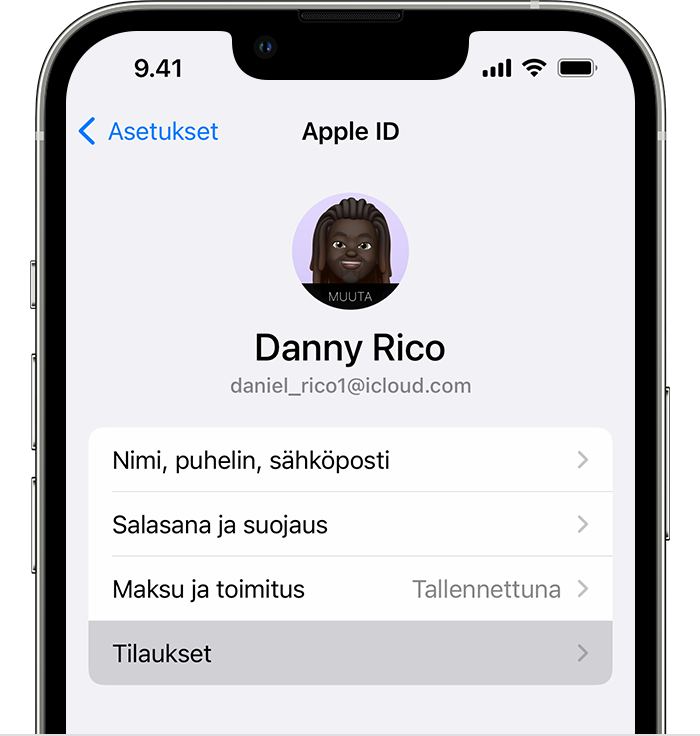
If you have purchased a subscription within the app or via the Apple App Store, you can follow the instructions on Apple’s official page, or modify your subscription in the app’s settings (in the map view, top right corner) by pressing the “Manage Subscription” button.
Here are the instructions copied from Apple’s page to cancel your subscription:
- Open the Settings app.
- Tap your name.
- Tap Subscriptions.
- Tap the subscription.
- Tap Cancel Subscription. You may need to scroll down to find the Cancel Subscription button. If there is no cancel button or you see a message in red text indicating that the subscription has expired, the subscription has already been cancelled.
If you purchased the subscription directly from our website:
You can modify your subscription in the app by going to the Parent Settings (map view, top right corner) and pressing the “Manage Subscription” button, or by modifying it through the first link in the email you received.
- Find the “Welcome to Lola’s Learningland!” email.
- Press the “View payments, update them, or manage your account in your customer portal. Log in now →” link in the email.
- Log in using your email (you’ll receive a one-time password, be sure to check your spam folder).
- Cancel or modify your subscription.
If your email appears to be missing, you can use the following link to access the customer portal: Lola Panda CustomerPortal.
If you encounter any issues with cancelling your subscription or other matters, please contact our customer service at support@lolapanda.com!
Note! Our customer service operates only on weekdays, so you will receive a response to your message by the next business day at the latest.
Who should I contact if my Lola Panda app is not working?
You can contact our customer service directly at support@lolapanda.com or fill out the contact form on our website.
We ask that you provide as detailed an explanation of the issue as possible, and include a screenshot or video if requested. In your explanation, it’s helpful to mention what you were doing right before the issue occurred, whether the issue was resolved by reopening the app, or if the problem reappeared the next time you opened it.
Please make sure your email address is correct before submitting the form, as we may not be able to respond if it’s incorrect!
Are Lola Panda games suitable for learning a second language?
Most of our apps are designed for children who are already familiar with the spoken language in the app. If the necessary language skills are not yet developed, it might be challenging to follow the instructions and understand how tasks are meant to be played. To avoid frustration, we recommend using an app where both the child’s native language and new language are available!
How do I transfer my subscription and progress to a new device?
To access your old subscriptions on a new device, log in with the account/email used for the previous purchases. If your device doesn’t find the subscription when starting the game, you can try the “Restore Purchases” button on Apple devices. If the subscription still doesn’t work, you can contact our customer support at support@lolapanda.com!
Currently, progress does not transfer when switching devices, but we are working on fixing this!
How do I share Lola Panda games with family members?
Family sharing may not work on all devices and in all Lola Panda games, but generally, apps that support family sharing will indicate this on the App Store & Play Store product pages. We also encourage you to check your family sharing settings to ensure it’s working properly!
Currently on Android devices, you cannot share the Lolas Learningpack PRO subscription via family sharing, as the subscription is considered an in-app purchase. We recommend making the purchase on the device where you plan to play!
Below are helpful links and instructions for managing family sharing:
Apple:
Instructions for viewing family sharing: Apple Family Sharing Instructions
For iPhone or iPad with iOS 16 or later:
- Go to Settings > Family.
- Tap your name.
- Check the Apple ID displayed.
- Tap Purchases.
- Make sure you’re signed in with the Apple ID used for Family Sharing.
For iPhone or iPad with iOS 15 or earlier:
- Go to Settings, tap your name, and then Family Sharing.
- Check the Apple ID displayed and ensure it matches the one used for Family Sharing.
Instructions for setting up Family Sharing: Apple Family Setup Instructions
For iPhone or iPad with iOS 16 or later:
- Go to Settings.
- Tap your name and Family Sharing.
- Follow the on-screen instructions to create or join a family group and invite members.
Android:
Instructions for viewing family sharing: Google Play Family Sharing Instructions
- Open the Google Play app.
- Tap your profile icon in the top right corner.
- Select Settings, then Family, and Family Library.
- Follow the instructions to enable Family Library.
Instructions for setting up a family group: Google Family Setup Instructions
- Open the Google Play app.
- Tap your profile icon in the top right corner.
- Select Settings, then Family, and Change Family Member Settings.
- Invite family members to join.
If Family Sharing isn’t working for Lola´s Learningland, you can still play the app by logging in with the same Apple ID/email used to purchase the app!
Can I get a refund for my Lola’s Learningland subscription?
Lola’s Learningland has a 7-day free trial. If you cancel during the trial, you pay nothing.
If you’ve been charged but haven’t used the app at all, you get a full refund within 14 days of starting your subscription. Email support@lolapanda.com with the email address you used for the subscription and the date of purchase. We’ll check and reply within three working days.
You can cancel any time, and your subscription stays active until the end of the paid period. Time already used is not refunded. We always refund double charges and errors.
For App Store and Google Play purchases, Apple or Google decides on refunds under their own terms. Read more: Cancellations and refunds.